Each client has a menu of actions in the Actions column of your client list.
Note: All clients, names, emails, appointments and other data shown in the screenshots are sample data we created for this guide. They are not real people or real records.
Steps
1. In Clients, find the client in the list.
2. In the Actions column, click the three-dot icon on that client’s row. A menu opens with Resend invite, Edit and Delete.
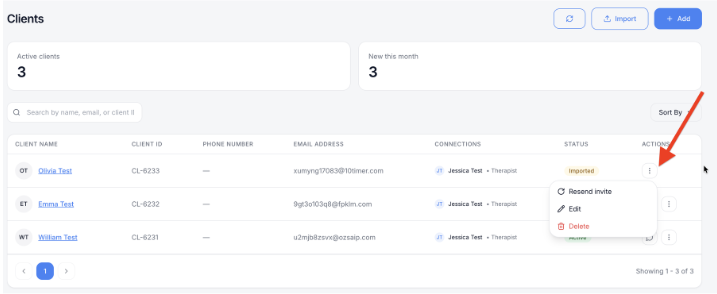
3. Choose what you’d like to do: Resend invite sends the client’s invitation email again. Use this if the client is still Imported and can’t find the first email. Edit lets you update the client’s details, such as a misspelled name or a new email address. Delete removes the client from your list. Be sure before you choose it.
Was this article helpful?

